


BuzzCut | The Erosion Clipper
BuzzCut | The Erosion Clipper

The Erosion Clipper
Designed for LOUD, CLEAN masters & FAT, DIRTY basses. Get 1dB louder than your current clipper.
Couldn't load pickup availability
Download BuzzCut
Linux & AAX support coming soon.


“I've been using it on heavy bass sounds and cinematic elements, and the range of tones you can get out of it is impressive. For sound design, this thing is a lot of fun.”

Trusted by producers worldwide


In my opinion, it paves the way for many other plug-ins based on this concept.
I have never been a fan of Clipping; none of the ones I have tried could withstand a 3 dB reduction.
They just choked.
Buzzcut is the first clipper to survive my merciless testing!
This means it can be used sensibly when needed.
Congratulations on a great idea!


• Advanced Dither Flavors: Beyond the current noise tilt (Dark Pink to Bright Violet), the developer could implement Slew Dithering to further refine the handling of high-frequency transients, or Floating Point Dither to address precision at the DAW's internal bit-depth. Offering different statistical distribution models (like Gaussian or Triangular) would allow users to customize the "fuzziness" of the erosion.
• Mid/Side (M/S) Architecture: Implementing separate controls for Mid and Side channels would significantly enhance the plugin's 3D feel. Pairing Mid-channel asymmetrical clipping for specific sub-bass grit with Side-channel erosion for "analog air" would allow for massive loudness without losing center-channel punch.
• HQ Mode Visuals: Right-clicking the HQ button should provide a distinct visual indicator showing whether Linear Phase or Minimum Phase is currently selected, as users currently find it difficult to tell.
• Bypass Fatigue: Add a setting to replace the animated noise on the bypass screen with a still image to reduce visual fatigue during long sessions.
• Linked Control Logic: Fix the bug where double-clicking a linked slider only resets that specific control to 0 dB, rather than behaviorally resetting both linked parameters.
• Metering and Scale: Incorporate a dB scale on the oscilloscope and a dedicated Gain Reduction (GR) meter so users can precisely measure the amount of "erosion" taking place.
• Signal Flow: Move the Mix knob after the output gain to follow professional signal flow standards.
Thank You so much for this new concept!

i like the GUI, with the resize, Global Settings menu including the 'DAW sync' options and especially the 'Delta' mode.
Tried it on a work in progress and got more LUFS than i usually get.
Then tried it on a recently finished track that's being released end of March on a big German techno label.
I delivered a 'non-mastered' version and a 'pre-master' done by me and Buzzcut + Acon Limit sounded better while getting louder. WOW.
(i'm no clipping expert. Relatively new to implementing it. But i am using Fuse ocelot clip, standard clip, K-clip and some more already.....)
Seems it could become a fav
Sound shaping is very rewarding! The visual representation of the changes is engaging. It's surprisingly fun for a clipper plugin
Random observations:
- Onboarding is very good, with a clear GUI and tooltips enabled, because it's a little more complex than I first thought (though I do think a manual that goes a little more in depth would be beneficial and interesting)
- Option to link input/output with right-click is genius! So quick.
- Robust Settings menu
The one visual I don't like is the animated noise on the bypass display – it's visually fatiguing, and I'd prefer a still image there. An option for that in Settings would be very much appreciated.
Also, it would be cool to have a stronger indication when 'Asym Mode' is active for Soft Knee than just a small DC button in the lower third of the plugin changing. Maybe something in or near the display, as that's where our attention is when moving the curves.
Bugs or oddities I found:
1. Double-clicking on input or output resets the respective control to default. But when input/output are linked, they don't behave linked when resetting one of them.
Example: Input is +3 dB. Output is -3 dB. They're linked. I double click on Input, it jumps to 0 dB (3 dB down). Output stays at -3 dB. What I would expect is Output to also go to 0 dB (3 dB up).
Maybe an argument I don't see can be made for both behaviors having their place? A toggle could be placed in Settings.
2. Double-right click also resets controls to default. This can lead to accidents especially with the input/output gain-linking. I would suggest only left-double-click resets controls.
3. Right-click to toggle gain-link for Input/Output only works on Input slider, not the Output.
4. Right-clicking anywhere on the Input/Output slider "groove" makes the slider jump to that position. This should only happen when left-clicking.
And I agree with what has been said about needing clearer indication for which type of oversampling (LP/MP) is active. Same goes for the two modes of the MIX knob.
Talking about the MIX knob: unfortunately it's implemented before the output gain. The "correct" way would be after it.
Very cool first plugin.

If I had one critique, it's that the controls are a bit finnicky and hard to wrap my head around. Some of the buttons kept getting engaged when I tried to just use the knobs, which kept throwing me off. I think those kinks will get worked out though, and this clipper is truly groundbreaking in its audio quality.

It's a quick impression but this actually sounds pretty great, I was able to push it much harder than the clipper it replaced and the distortion effect of the clipping is quite pleasing instead of being ugly. A GR meter would be a nice addition, to see how much has been clipped.
The gui is well thought out too, lots of creative potential here, great job on your first release.
This thing is so clean, crisp and open sounding!
I´m not a programmer but the sound somehow reminds me of Maat´s FiDef algos.
Will do some more testing but so far, I´m impressed!
Maybe it would be good if, when right-clicking the HQ button, you could more clearly see what is currently selected — Linear or Minimum Phase. As it is now, it’s very difficult to tell.


I like the idea of offering IIR and FIR options for the oversampling filters (everybody should do that IMO). Aliasing is nicely kept in check, especially at 16x, without eating a ton of CPU. I also like the noise being able to mask it, basically an original implementation of dither, but with some interesting shaping and level options.
I'd love to have some kind of db scale on one side of the oscilloscope, just to have hint of how much it clips, but other than that it's a solid release.
It's a really well laid out plugin, but it takes a little time to get used to and understand everything and some settings are a little hard to grasp at first. Luckily there are helpful pop-up tips when you hover over the various buttons and sliders so that makes it more easy. It's got delta mode, so it's easy to set up and listen to how much you are affecting, and autogain. Both linear and minimum phase OS up to 16x is a big plus. Wish it had offline settings though. I appreciate the graphics also, and being able to see what your doing to the waveform.
I've been facinating by using noise in various subtle ways to enhance sources, so I really enjoyed playing with upward noise also, for adding textures. Reminds me a bit of fidef and similar plugins.
It's not just a clipper, but a creative sound-shaping tool! Everything seems very well thought out, and I'm not missing much, except maybe a manual. And offline OS settings.
This clipper is pretty unique and sounds incredibly open and clean. Very true to the source.
Regarding the dithering / noise approach, Airwindows and Maat Fidef come to mind .
I highly recommend to do your own testing - might be the one you´ve always been looking for!
Low cpu usage is always nice.
I'll give it a more thorough test on a song i'm mixing later.
Nice work on your first plugin!

I think the GUI is pretty unique and cool. I love it when stuff is functional but has its own aesthetic and isn't copying everything else that's come before it.

Love the screensaver thing! nice touch! Great attention to detail and excellent graphical efficiency overall, even on my lowly Iris Xe, Core i5 the scope is very smooth and fast.
Visualizer mode plz... lol
I did notice this sounds particularly good with some resonant harmonics added to it. *shrug
It also does wonders for SW fuzz pedals...

More importantly the brass, the bass, the keys really cleared up with Buzzcut helping out Acon more than my usual clippers. That typical mid range limiter mush was just gone.
Very happy. Will test more but expecting to pick this one up.
I get the feeling this is to clippers what dynamic eq was to static eqs.
Great job!

Make things exploding in loudness in a cool way. Or destroy things in a post 3rd Industrial Revolution way.
I need to investigate more.

The grit a bass can get with this is great so instant purchase
In my hip hop productions, I was able to push things louder while keeping the punch and avoiding that brittle, collapsing feel that can happen when clipping gets aggressive. It feels controlled, solid, and surprisingly clean even when driven hard.
Really hoping I’m still able to get a license, this is a very awesome clipper and I’d love to keep it in my workflow.
What continues to stand out is how stable the distortion character remains when pushed into heavier territory. I tried the usual scenarios that often make clipping stages start to sound stressed: serial clipping, dense ceiling-pinned material, clipping feeding into downstream dynamics.
Instead of things turning brittle or developing that familiar hashy texture, the harmonic character stayed surprisingly cohesive. It almost feels like the distortion evolves more smoothly rather than piling up in a rigid way.
Pure speculation on my end, but I wonder if the erosion concept is playing a role here, maybe disrupting the usual ‘fixed ceiling’ behavior that makes repeated clipping artifacts so easy to hear. Whatever the reason, the top end just feels more composed when driven hard. Low end response also feels very solid. No strange softening or transient sag that sometimes creeps in with aggressive clipping. The punch stays intact while the density increases.
What’s interesting is that this doesn’t feel like replacing Gold Clip or Ocelot philosophically, they still have very distinct characters that I genuinely like. Buzzcut just seems to react differently when pushed harder, which happens to align very well with how I tend to use clippers.

Once I start pushing Buzzcut past a certain point, I do begin to hear the noise kick in and I want to spend more time experimenting with the controls and parameters. That said, this is a super compelling tool and it opens up some very interesting possibilities in the mastering workflow.
Really impressive work.
Just as mentioned I could push the master a tad louder than with my go-to.
Hard clipping + a dB and a half of erosion did the trick elegantly, very cool stuff !
That’s very promising.
Now, while I don’t like the esthetics of Buzzcut much, I’m torn wrt UX itself.
All the layered controls are great but a « one knob = one feature » - despite the numerous parameters - would be a good trade off for a more readable interface.
I also think some permanent display of crucial values like Ceiling / Erosion would make Buzzcut faster to use.
Speaking of quality of life features, I wish I could also directly type-in values for all the parameters.
The central display is cleverly executed and intuitive to use once you grasp what it does, but too finicky when it comes to the exact zone you have to click in to drag a specific parameter.
On the mixbus it allows me to push quite a bit and retain a clearness, quite impressive.
On drumgroups it also shines. Tweaking Buzz to get the perfect combination of dither and clip.
This really is one to watch!
I had been thinking about more ways to clip audio and your approach is something else.
+1 on the Mix knob after the output
Some things i noticed:
- When turning a knob up and the mouse pointer moves up, then the tip pop-up appears at the mouse pointer, instead of the knob i'm turning.
- It took me a while to understand that the knobs, Asym, Knee, Tilt and Hard must be clicked on/off. I sort of expected them to turn on by turning.
Good luck with the trial for now.
All in all a very very solid clipper and tool to make things very loud. I don't know if it will replace all my other clippers, but definitely a useful tool.
Really interesting plugin.
At first i couldn't find the soft handle and it worked like a normal hardcliper with the bonus of buzz
Buzz can really shape the hard edges of hard clipping really well in some cases, really enjoying the results comparing with other hardclipers
then i discovered the SOFT handle , with the soft and knee now i can get a lof of variation, this soft clipper together with buzz and hard really shines. You can really shape the knee of the clipping and the bump before clipping can make a diference.
Really amazed because i use clippers a lot , the BUZZ with the soft/hard knee really makes a difference compared with other clippers.
I only tested in single sources and not in the mixbus
Congratulations on this one
the GUI for me can be better and a lot of good opinions already on the thread, yes, put meters for the clipper. No use for the test tones for me
Keep up the good work

In order to get a true understanding with out being swayed by volume increases i have been using these clippers in between tbpro ABLM and then adjusting the output of each clipper to easily flip between with minimal, if any level change required by ABLM.
Certainly Buzzcut has a sound and a very nice modern gui.
The ASYM dial is really good for small changes in the sound and i found it great on the bass loop that I tried it on.
On occasion i did notice that the changes in sound did not come back as to what i had heard 10 secs previously, yet i was still only tweaking the same dial. Confusing but this may have been a bug in the beta version of Bitwig….
However the HARD clip dial, for me as i was testing at an input of -18db vu has such a limited visual range when turned to the minimum and then just closes all the way. Thank fully you can grab the top horizontal red line to bring the threshold down further.
This was quite interesting as the bottom horizontal threshold line could be grabbed also to bring up separately. I could have sworn that the graphics was showing that I could change the wave separately from the bottom without affecting the top of the waveform, but on re-checking it doesn’t seem to….Unless I have inadvertently changed some other parameter...
With the dial it generally does them together but there just isn’t enough fine control with the range of the dial, which I hope gets looked at.
Edit: It appears that instance was not working correctly as something was going wrong and with a new instance the red lines only work together….and now they do again work separately!!!! I will have to try in Nuendo or something rather than Bitwig beta….
I will still play around with as I haven’t yet understood the tilt and the noise section which i liked yesterday but seem to not want any of that noise today!
LUFS metering is useful. I haven’t managed to get the peaks as contained / brick walled as my usual clipper, but that could be user error….
In practice this could be quite a fast workflow for clipping compared to some other highly tweak able ones, although tweaking can be done here.
Dragging the size of the GUI is very responsive, works well and would be useful if displaying several different channels at once.
Seems to be a pretty good contender that I will certainly keep an eye on and hope that some further tweaks/ updates are provided as this could be a very good contender and with a unique approach to clipping.
Thank you for bringing it to the marketplace

I couldn’t get it added to mono tracks on Logic, so hopefully a true mono version is in the works. But liked that it's 0 latency.


Highly recommended. It's doing a very different thing but working in Delta mode it kinda reminds me of what the Apulsoft Unmask gets up to.
But I gotta say that (leaving aside the less than ideally visible input/output numbers I mentioned above) while I don't really have a specific problem with the UI (apart from being colourblind I feel like there's stuff I'm missing out on but I don't know what lol, ditto using a trackpad) - sorry, as a plugin it is definitely making more sense to me when I look at it as the sliders in the Reaper generic UI. So I guess I'd vote for the option of a flat interface.
Although I felt could get good results I found it really confusing in use. Something closer to one knob per function would be a lot friendlier I think. The way the click/drag/right click logic changed between each knob was was disconcerting and made it difficult to navigate. I was continually having to read the tool tips and it felt like I was given direct access to parameters that I would change rarely and when I did it would be a very deliberate action. Like upward/downward and mono/stereo on the Tilt. I could see myself rarely needing these... Maybe something like the way Arturia plugins have a drop down Advanced section could work? Or maybe two different modes? Sound Design and Simple 2 Buss?
I found it very easy to get overs... even with True Ceiling enabled.
I don't know if it was just my machine but I didn't find the oscilloscope very useful. Couldn't find a timing option which allowed me to easily identify how much kick was clipping compared to snare. I really like the way that the Sonible Learn Limiter or Standard clip shows this! Both really understandable. Maybe not as sexy looking but very clear what's happening. I could get a general idea what was going on but it could be more helpful!
I didn't like the way the that if I linked input and output gain the waveform got smaller so I lost information as to how much I was clipping? Or did it no longer clip? Really hard to tell.... Ticking prefader scope changed this but then the oscilloscope seemed to run much faster making it REALLY hard to understand.
I felt that the subtractive erosion tick box should come out of the menu. As should true ceiling. Both things that I would flip in and out to try...
Hope this all makes sense and is helpful! It's a really intriguing plugin for sure. I'm sucker for the subtle noise manipulation on the master and could really see it becoming one of my commonly used tools....
For reference, I'm the target user for this device - loud Bass Music/Trap/D&B/etc. I run a typical clip-to-zero loudness mix style, with TBPAclip as my mix and summing buss clipper and Krafter as my 2-buss/mastering clipper. I've got my production techniques refined to the point where I'm generally hitting -5.5 to -3.5 LUFs on drops before any master processing, so "more loudness" isn't really a problem I'm trying to solve. But I'm always open to new ideas, so wanted to give this one a try.
On the positive side, this BuzzClip seemed to have a nice rounding of transients that I've never heard in other clippers. I think this would be the main selling point and why some people claim it sounds more "analog" or "3D" than other clippers. Not sure if that's the 'erosion' or the interaction of all the processing stages, but that softening sound is very compelling.
On the negative side, lots of issues here. First, I don't find the controls all that intuitive and a decent manual would help. I rarely feel like I need a manual, but this one is an exception. I'd like to see detailed descriptions about how each control is implemented, because the tool tips aren't enough. It's not entirely clear what the internal signal flow is. Or what the interaction between the soft clipper, erosion, and hard clipper is. Or what all this means as it is represented by the Visualizer. The Visualizer is confusing - it looks like the erosion is happening in db range between the soft clip curve and the hard clip cutoff? But that logically doesn't make any sense in my primitive brain.
Second, even with True Peak engaged this plugin bleeds peak overs. I'm not even sure the TP actually works at all. Not good.
Third, it crashed Bitwig 4 times before I finally threw in the towel. Twice when changing the oversampling, once when messing with the noise function, and once seemingly for no reason at all. Granted, Bitwig 6 is a real picky ass and crashes a lot, but with Buzzcut the crashing is next level.
Finally, while the rounded transient sound Buzzcut provides is nice, it's also a lot of work and tinkering to get all the levels right. You can do something similar in Darkplace Sloth (admittedly not at all the same type of process) with basically one click-drag. IMO Buzzcut is a lot of work for a relatively minimal payoff. I'd probably be into this plugin if it was 1 or 2 quick moves to paydirt, but there are just too many things to keep an eye on when working with it - like it needs a 'safe' mode.
The improvements I would make (manual notwithstanding) is fixing the true peak, and coming up with a better set of visuals. Maybe separate visuals and metering for the soft clipping, erosion, and hard clipping processes. I find it really hard to understand what's going on with everything just jammed together and no explanation. Where is the signal in relation to the soft clipper? Am I pushing into the erosion via output from the soft clipper, or adding it into the signal? Or both? What are the levels moving as the signal moves from one stage to another?
There's a really good idea and some very nice DSP hidden inside Buzzcut, but this one feels like a prototype at this point. I wish the developer luck because it's really hard to bring a genuinely new idea into this crowded space, but he did it. I'll definitely be keeping an eye on the evolution of this one.

When pushed hard it created this uncomfortable sensation on my ears like a constant pressure wave, something I've experienced listening to some of those ultra extreme crushed DnB tracks sometimes. Definitely seems to flatten sense of depth ever so slightly. There's no doubt it can go very loud but, its not for me this one sadly.
1. I don't like looking for the treshold line on the screen.
2. I don't like the lack of values on the potentiometers.
3. He goes into audible distortion very quickly and eats a lot of sub/bass and the HF punch.
BUT
The same thing is done by Prism AD-1 (as well as Lyra), haha
And even taking into account all the disadvantages (and not particularly loud output in the end), it sounds just as soft, gentle, wide and musical!
It's definitely not suitable for every case, but it works pretty well. For example, Ghz will be louder and more powerful, but less dynamic.
It's a great color and a great compliment to the existing clippers on the market.

Hear What BuzzCut Can Do
The only difference is a single loudness-matched instance of BuzzCut.

Why Standard Hard Clippers Sound Bad
Standard hard clipper VST plugins have a fixed digital ceiling.
This has two fatal flaws:
- It collapses your transients to mono during clipping events.
- It adds sustained musically orphaned harmonics – digital foldback aliasing.
This combination turns your mix into a thin, harsh metallic mess.

A New Approach
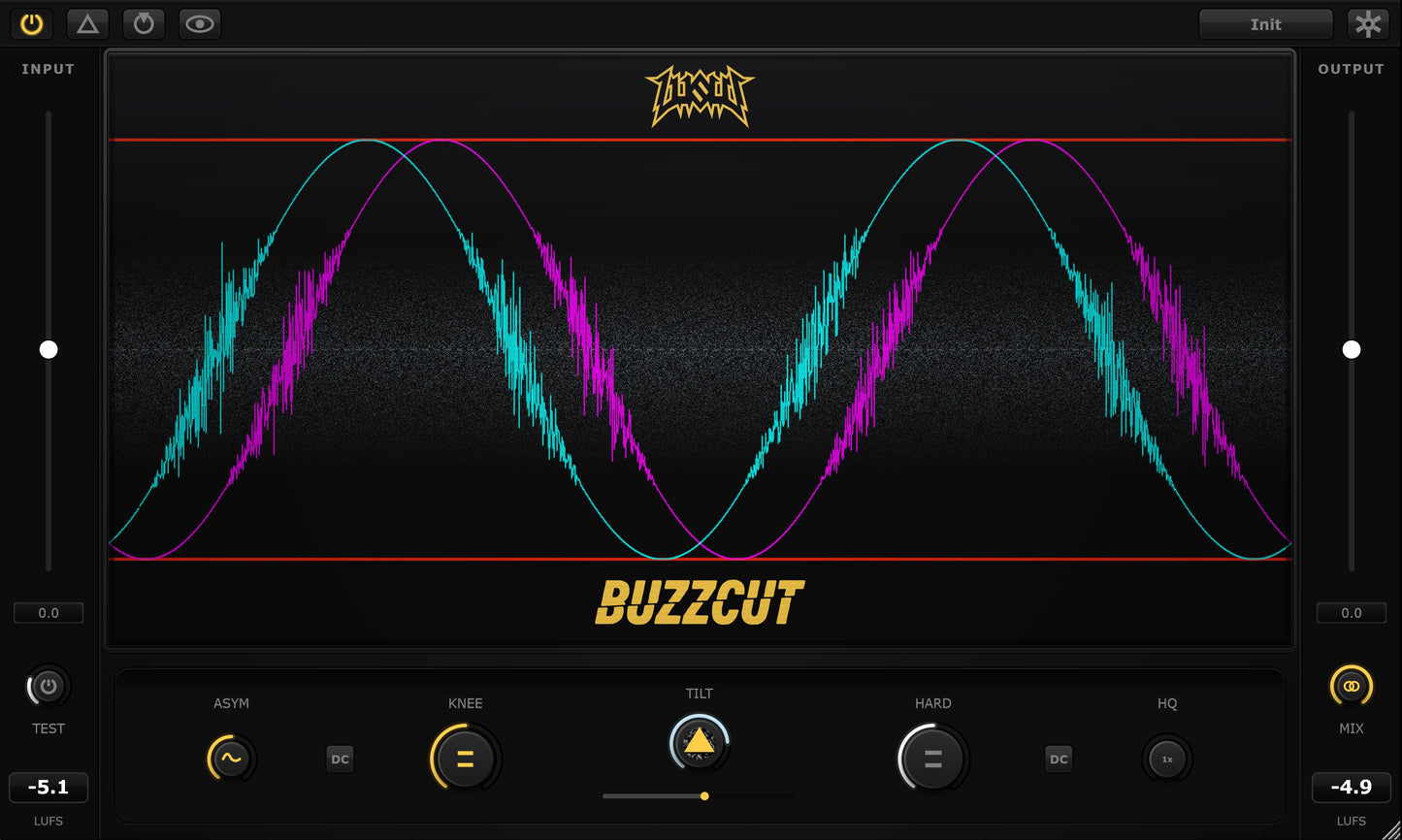
BuzzCut is the world's first erosion clipper plugin. It modulates the clipping threshold with shaped noise.
This creates a unique transient response that:
- Retains 3D stereo depth.
- Masks inharmonic foldback aliasing with "analog noise" when clipping events occur – similar to how dithering masks truncation distortion.
Now you have the freedom to choose: analog air.
BuzzCut Features: A Creative Sound Design Monster
Everything you need in a mastering clipper

Asymmetric Distortion for Even-Order Harmonics
Unlinked positive and negative clipping thresholds. Apply different wave-shaping curves and erosion to each polarity independently. This generates even-order harmonics – the warmth of analog tubes that no symmetrical clipper can touch.

DAW-Synced Dual-Channel Oscilloscope
Stop guessing: see exactly what you're doing to the waveform on the LEFT and RIGHT channels simultaneously in real-time. Detach the oscilloscope for monitoring and customize the display to your preference. No other clipper gives you simultaneous dual-channel visual feedback with DAW sync.

Multi-Stage RMS & LUFS Auto-Gain Matching
Instant level matching with one-click LUFS calibration. Audition the sound, not the volume jump. Three separate stages of RMS auto-gain compensation (soft clip, hard clip, mix) ensure your signal stays controlled even when driving it to -3 LUFS and beyond.
The Erosion Engine
- Custom Tone: Shape the spectral balance from Dark Pink to Bright Violet – dialling in the perfect analog character for everything from bass-heavy dubstep to delicate acoustic recordings.
- No Sidechain Required: Noise flutter and texture are native to the plugin. No routing, no sidechain.
- Pre-Filtered Noise: The modulation signal is fully stereo, with low-end rumble and blistering highs removed at source – leaving only analog air to help your mix breathe.
Exponential Soft Clipping
Preserve Transients While Maximizing Loudness
Standard hard clippers delete waveform peaks. BuzzCut doesn't. The exponential soft-clipping curve compresses peaks rather than cutting them – meaning transient detail is always retained, no matter how hard you push.
Achieve -3 LUFS and louder without sacrificing punch or clarity.

Intelligent 16× Oversampling
Want absolute perfection? Engage 16× Linear Phase or Minimum Phase oversampling for pristine anti-aliasing.
BuzzCut's unique True Ceiling protection prevents post-filter ringing from pushing peaks back above 0dB – protecting your oversampling efforts when reducing bit depth from 32-bit float to 24-bit.
No other clipper has the foresight to protect you from this easily missed but critical technical blunder.
BuzzCut Plugin Specifications
Try BuzzCut Free for 14 Days
Don't take my word for it. Download and install the full version of the world's first erosion clipper plugin instantly and use it in your sessions for two weeks. Completely free. No sign-up. No commitment.
Download the Free TrialWindows & macOS · VST3 / AU · Full version, no restrictions
100% Money-Back Guarantee
If BuzzCut doesn't give you a cleaner, louder master than your current clipper, just email me within 30 days. I will refund 100% of your money. And you can keep the license.
I'm that confident BuzzCut stays in your template forever.

Built by an Independent Developer
I'm Dave (aka LusiD), Indie dev, music producer, audio engineer, and father. BuzzCut wasn't built by a large corporation. It was built because I needed the best possible clipper for my own bass music sessions, and nothing on the market did what I wanted.
When you buy this plugin, your support directly provides for me and my daughter... and also fuels my unquenchable desire for unreasonable quantities of material wealth. My goal is to own 12 hypercars and a private villa in Ibiza with blackjack and hookers. I want to hire several supermodel assistants to fan and feed me grapes on a velvet poolside sunbed while my physical body softens and decays until I gradually transform into some sort of rich, grotesque abomination. Sort of like Jabba the Hutt.
Only you can make my dreams come true ❤️
Frequently Asked Questions About BuzzCut
An "erosion clipper" modulates the clipping threshold with shaped noise on a per-sample basis. Traditional hard clippers use a fixed ceiling that create more sustained unmusical foldback aliasing harmonics. BuzzCut's erosion engine randomizes the threshold position, converting tonal aliasing artifacts into broadband noise that sounds like natural "analog air" — similar to how dithering masks truncation distortion. BuzzCut is (as far as I'm aware) the first clipping plugin to use this technique.
BuzzCut takes a fundamentally different approach in a few areas. BuzzCut's stereo erosion engine adds a natural "3D dimension" during clipping events that conventional clippers don't (they actually collapse to mono during clipping events). Many reviews report that BuzzCut's erosion and soft clipping combination lets you transparently squeeze another 1dB out of your master before choking. It also includes features competitors lack: asymmetric distortion for even-order harmonics, a dual-channel oscilloscope, and multi-stage LUFS auto-gain.
BuzzCut ships as VST3 and AU for Windows 10+ and macOS Monterey+. It's compatible with all major DAWs: Ableton Live, FL Studio, Logic Pro, Cubase, Studio One, REAPER, Studio, GarageBand, and others. There have been reports of V1.0.0 instability in Bitwig and verification issues in Logic so be sure to download the trial first to test these out for yourself until that gets ironed out. AAX support for Pro Tools is on the to do list. No iLok or third-party license manager is required.
BuzzCut was specifically designed as "the ultimate mastering clipper". The combination of oversampling, erosion and exponential soft-clipping preserves transient detail and stereo depth at extreme loudness better than any other clipper on the market. The multi-stage LUFS auto-gain lets you A/B the sound without volume bias. The delta lets you hear exactly what you're doing. True Ceiling prevents peaks from sneaking past your 0dB target. Producers in bass music, EDM, hip-hop, pop, and reggae are all using BuzzCut on their master bus.
BuzzCut offers a full-featured 14-day free trial built in. Instant download. No account. No credit card. No restrictions. Download the Windows or macOS installer from the top of this page and start using it in your sessions instantly.
BuzzCut's core processing path is 100% zero latency, making it fully suitable for live performance, real-time monitoring, and low-latency mixing. The optional oversampling modes add minimal latency (around 1.5ms) when you need maximum anti-aliasing precision.
Most clippers apply identical processing to both polarities, producing only odd-order harmonics. BuzzCut lets you unlink the thresholds and apply different wave-shaping curves and erosion amounts to each polarity independently. This generates even-order harmonics — the warmth of tubes and tape — giving you tonal options no symmetrical clipper can achieve.